Pentium Socket 5 Build - Rounding out 2022 with a PC

As 2022 comes to a close I've completed one more PC build for the year.  This one is nostalgic for me, as the target year is 1994, which is around the time that I got my first PC.  Also, this machine replaces one of my first Retro PCs that I purchased back in 2019 an Epson Pentium 75MHz that was a Socket 5 Machine.  I damaged that machine while I was trying to perform a processor upgrade to bring it up to a 100 MHz chip, a sad episode which I regret quite a bit.

I just finished a Custom Socket 7 build which I'm very pleased with.  I think that these custom builds will be easier to experiment with and also easier to maintain in the long run, so although I do have one other Socket 5 machine, I have been on the lookout for another Custom Build.  Free Geek Twin Cities was selling this custom build at a really good price and I jumped on buying the machine.

The case on this one has yellowed a bit...

But overall I'm quite pleased with the appearance.  This build is based on an Asus Motherboard, PCI/I-P54SP4.  The machine was working as I got it from Free Geek but readers will know I'm not one to leave well enough alone.  According to Free Geek the Dallas clock chip was dead, so I de-soldered that and added a socket for the replacement clock battery, and I also lubricated the CPU fan which was running a bit rough.

Vogons has a nice scan of the manual for this board.  After alot of trial and error, I was able to upgrade the RAM a bit (As configured, it accepts only double sided FPM RAM SIMMs).  I have 48 MB RAM in the machine, but as it's a Windows 95 machine and will normally be running in DOS mode anyway I don't think this will be a problem.

I upgraded the old proprietary 1x CD-ROM to an IDE CD-ROM that will read CD-Rs, this is a nice "quality of life" improvement for the machine.  I also added an IDE ZIP drive which makes it much easier to move files onto the machine.

The machine is still sporting a 1GB Hard Disk drive, although I may replace that with a CF card to IDE adaptor pretty soon.  It's running Windows 95 and it has both an ISA 3COM Network Card and a Sound Blaster 16 (The less desirable CT2940) that work well in both DOS and Windows 95.

The final upgrade on this machine was to CAREFULLY install the Pentium 100 processor that I'd originally bought for the Epson machine.  It's working well and give this motherboard is maximum speed Intel processor.  Since the machine has a Front Panel MHz display and I couldn't find any documentation, I had to do some experimentation to set the display to 99 MHz, as this one doesn't have a third digit.  It's a cool look, and my only PC with the front panel MHz display!

So, perhaps this completes my the last Retro computer project for 2022.  Overall it's been a great year in Retro and I'm looking forward to the challenges and learning that will come in 2023!
Sometimes They Come Easy - Socket 7 Pentium Build

Lately I've had several projects in my backlog that keep stalling out due to broken parts on the original machine, broken accessories, or broken replacement parts.  I've been wanting to complete projects for an original Mac 128K, a Sun Ultra 5 Workstation, and an Amiga 500 among others but these projects are on hold for parts.

So, in the meantime I was looking for something fun, easy, and low cost.  Once again, Free Geek Twin Cities has come to the rescue!  One of the gaps in my collection has been a nice Socket 7 Pentium.  I've had this on my wish list for some time, but watching Phil from Phil's Computer Lab go over his "daily driver" retro gaming PC really got me thinking about this again.

So, a couple of weekends ago I was in Free Geek and purchased a New Old Stock AT tower case that came from a computer store that had recently closed in our area.  The case was still in the box and it was immaculate.  It was an AT / ATX convertible case, and I had to do a bit of drilling and Dremelling to get an AT Power Supply fastened down inside the case.  I also had to drill out the power button and cut it a bit shorter, but I was able to get an AT power supply in the case and it looks really nice.

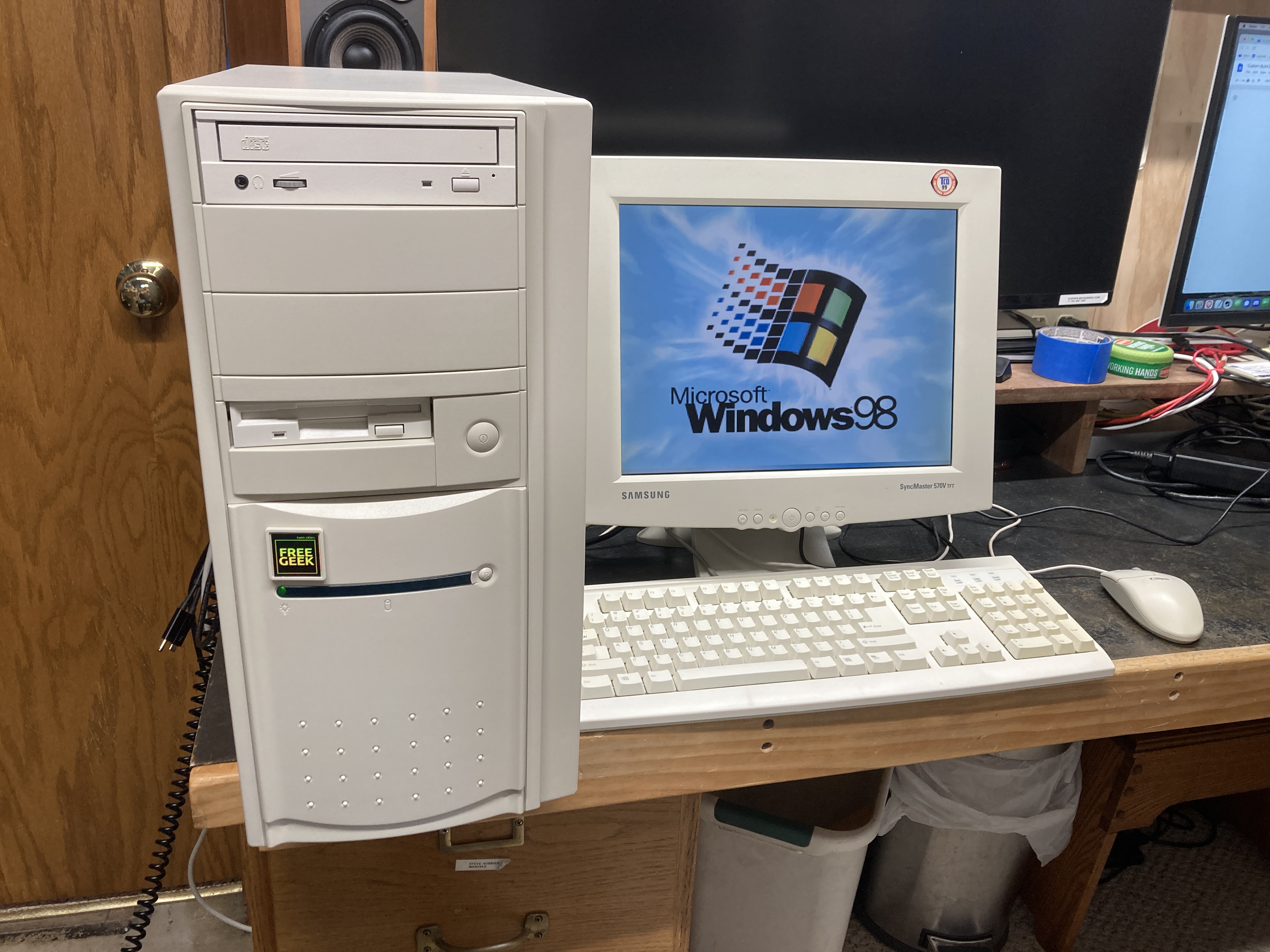
The Motherboard, CPU, and Memory came from a Socket 7 Build at Free Geek that had sat for a couple of weeks. Perhaps it didn't sell because the case wasn't perfect but since I was swapping the case anyway I didn't care about that.  The mainboard is an Asus P/I-P55T2P4.  I found a nice generic looking CD drive and I had to replace the Floppy Drive on it because that wasn't working well.

The other upgrade per Phil's video was to put an upgraded video card into the machine with a Digital Interface.  I don't have an Nvidia card (with the hardware scaling that Phil mentions), but I do have an ATI Radeon PCI graphics card with both VGA and DVI outputs on it.

For now, I've paired the computer with a Samsung SyncMaster Beige LCD panel that also came from Free Geek...

I've installed Windows 98 and all the Windows drivers on this machine, but I've also loaded DOS drivers and DOS games as well.  It's a build I'm very happy with and certainly allowed me to "scratch the itch" of completing a build with minimal pain and effort.

Now back to that Amiga 500...

The Commodore VIC-20, My First Computer

The Commodore VIC-20 is a special computer for me as it was the first computer we ever had in our home.  My Uncle Frank gave me his old computer in the '80s.  At that time, I had shown some interest in electronics, but it was generous and a bit of a risk on his part because I hadn't really demonstrated any affinity for computers.

Anyway, one Summer Uncle Frank brought a huge box of stuff, including the computer, tape drive, game cartridges, printer, and tons of software on Cassette.  Of course the Commodore manuals were also there along with some other computer books about learning how to program.  This was back in the day when our computer learning came mostly from books so having these was a huge benefit.

I think my Grandma gave us an old Color TV set that she had in her bedroom to use as a monitor for the computer since my folks didn't want me to take over the main TV set in the living room with the machine. I'm sure they realized that I'd be wanting to use the computer during Prime Time, and they were right.  I read the books cover to cover and did several of the "Type In" programs, although I was fortunate to have so much software saved on tape.  There was a large library of material there, and I'm not sure I even ever got through it all.  I experimented with Basic, with Poke and Peek commands and I learned about manipulating sounds and the colors on the screen.  I never got far enough in to learn Assembly language, and I wouldn't get into that until College days, but it was a wonderful experience and I have found memories of using the VIC-20.

I wish I'd have saved the machine, or at least taken pictures of it.  I do not think that any pictures of the setup survived.   I believe that I ended up damaging the machine by trying to wire an electronics experiment onto an edge connector on the back.  After I'd damaged it, making repairs of the unit was beyond my skill at the time and so that was the end of my Commodore involvement in the 80s.

Fast forward to the present day, as my readers will know I've been learning alot about fixing Retro computers from the 8-Bit era.  There's a ton of documentation and how-to repair videos on the Internet.  When I want to wire up an experiment to a computer, I use a Raspberry Pi (Which I can easily afford to loose).  So, it was safe once again for me to buy and use my first ever computer, the Commodore VIC-20.

Thanks to my friend Matt for selling me a Commodore VIC-20 out of his collection.  This is a nice early example.  It has an external 9 VAC adapter and a linear power supply inside the case.  It's got the old badge style, but not the PET style keyboard.  From the price tag on the box it looks like the original owners bought this machine for $99 at Target in 1981.  I also got a matching VIC-1541 drive, and an assortment of Cartridges.  Here's a picture of the setup when I was still testing out in my garage...

Since the pictures, I've gotten a Datasette from my friend John, a Joystick from Free Geek Twin Cities and I have the entire thing paired up with a large Sony Trinitron Flat Square CRT Television.  Of course it goes without saying that I never remember the VIC-20 looking so good.

"Avengers", the Space Invaders clone for the system has become my favorite cartridge.  The VIC-20 is an amazing computer and I'm so glad to have one in the collection.

Documentary / Storytelling Videos and Primary Source Videos on the Web in the 2020's

For me a large part of the appeal of the Retro and Vintage Computing hobby is learning about how to the machines work and how they would have been used.  These aspects of retro computing are best experienced hands-on.  But I'm also super interested in the historical context and the teams that built them both because these are amazing stories, and because those who cannot remember the past are condemned to repeat it.

One of the things I'm realizing is that for the documentary / storytelling YouTube creators (channels like the 8-Bit Guy, LGR, RMC Retro, 65ScribeTech Time Traveller and Nostalgia Nerd) they spend alot of time searching through archival material and viewing old photos and video.  Hats off to them for bringing awareness and attention back to these machines and the stories of the teams who created them.

During the VCF Midwest 2022 YouTube Panel Discussion one of the questions was about how much more effort it takes for the creators to make this type of content.  It is a very time consuming activity with some videos taking weeks of effort.  I would like to say that my own interest in Retro Computing has a great deal to do with these stories and I would like to salute these creators for their hard work.

There is another class of channels and websites that are dedicated to presenting primary source material in its original form.  There is more and more historical footage being uploaded to YouTube and other platforms like Archive.org.   For the retro computer enthusiast there is an overwhelming amount of original source material out on the web.  Here's a quick overview of some of these sources that I've been enjoying recently:

"The Computer Chronicles" and special events like recordings of MacWorld events are only a search away either at Archive.org or YouTube.com.

The Computer History Museum has been uploading a ton of oral history interviews from their archives.  

Both the Vintage Computer Federation and VCF Midwest have been uploading the talks from their events.  Sometimes these talks are given by primary sources, the people who were there when the machines were created and many of them are quite good storytellers.

The Computer History Archives Project has also been uploading a great deal of interesting historical footage.  

Dave's Garage is interesting for Microsoft users because for some of the topics that he discusses he's a primary source (and he's also very transparent about when he was "in the room" and when he wasn't).  

The Centre for Computing History has also published some good video interviews of historical importance, and is a good source for many of the parallel developments that happened in Britain in the early days of computing.

Here's a fun screenshot from one of these historical movies, Bill Gates in the computer lab at Microsoft.


In the background from Left to Right we see an IBM PC 5150, a Compaq Portable I, and a Macintosh Plus, so this must have been 1986 or later.

What are your favorite sources of primary material on the web?  Please leave a comment or send me an email if you have other sources that I should have included here.  Thanks!

A New History of Modern Computing - An Important Book for Fans of Computing

I've read and very much enjoyed the book "A New History of Modern Computing" by Thomas Haigh and Paul E. Ceruzzi.  I've completed the book and I thought I should post a review and let readers know what they could expect from the book.  The contents of the book is copyrighted and is not one of the books that MIT press publishes online, but the price is reasonable.  A free sample is available on Kindle.

In addition to reading the free sample, you can get a bit more of the flavor of the book by reading the paper "Finding a Story for the History of Computing".  This idea of having a story to tell, or even better multiple stories to tell is quite compelling.  The book unfolds as a series of developments from the various users points of view, scientific computing, business computing, home computing, etc, as well as the more typical stories of the people who designed the machines and the chronology of developments.

The early parts of this book filled in many knowledge gaps for me, not just isolated facts but also connections between the history of the concepts and their current use.  As an example, the fact that pipelining and hardware parallelism were originally features of mainframes before they "trickled down" to workstation computers and PCs.  Of course it makes sense but because I had no exposure too mainframes, and little too workstations, I did not know this.  For me, the earlier parts of the book were both interesting and informative.

Once the books's history moves into the Home Computer and Personal Computer revolution, nostalgia will kick in, depending on your age, that may happen at different points in the timeline, but there is good coverage from a wide range of developments.  There are a couple of nostalgic games that one naturally plays when reading the book, answering these questions:

The first computer mentioned in the book that you ever used:
Apple II, Page 181.

The first programming language that you ever used:
Microsoft BASIC, Page 171

The first computer in the book that you had at home:
Commodore VIC-20, Page 196

And of course the lists of computers that you've every owned or worked on.  If you are a computer collector, then of course you'll be interested in reading about the computers that you currently have in your collection.

But as the book moves into modern times the tone of the book shifts.  Or perhaps it's just my response to the nature of the stories.  The book explains well the rise of the smartphone and AI, the idea that software is everywhere and that it is a universal solvent that dissolves everything (for example, the iPhone replacing: alarm clocks, maps, land line telephones, mail, TV, etc, etc),  This point of view is quite interesting.  As an example, when I look back at videos and lectures from as recent as 2014, I notice that the dominance of Intel is still assumed, but I'm writing this bLog article on an ARM powered Apple M1 machine, the fastest computer I've ever owned.  Apple has made three hardware architecture changes in the lifespan of the Macintosh and this last one has been by far the least painful, almost un-noticeable, and again this is arguably because of how good of a job Apple has done on the software emulation layer that's used to bridge the gap between old software and this new hardware.

I believe that the paradigm that the authors suggest is a very helpful one as we consider the future of computing.  It challenges us to try to decide what is the best kind of life that we can live, and how computing fits into that life given its ubiquity.  I came to the end of the book with more serious questions than answers, but perhaps this is fitting for those of us who work in the tech world and have a disproportionate impact and a therefore a responsibility to our fellow human beings.  

Technology is not inherently good or evil.  These are tools that we as individual human beings wield.  To the extent that we each understand how to use these tools we bear the responsibility to use them well.  My kids will tell you that they get sick of hearing this, but Uncle Ben (Or Aunt May, depending on your age) was right when he/she told Peter Parker that with great power comes great responsibility.

If you want a book that will make you think, I recommend "A New History of Modern Computing".

Digital Equipment Corporation - AlphaServer 300 4/266

This year I missed VCF Midwest in Chicago.  I had a really great time last year and I was disappointed to miss out.  One of the retro collectors I know from Free Geek Twin Cities was willing to set aside several of the machines that he was planning to sell there.  You'll be hearing more about these computers on my bLog as I work my way down the stack.  The first in the series is a Digital Equipment Corporation Alpha Server 300 4/266.  This line was released in 1995 and this particular machine dates from 1996 or 1997.  It's one of the lower end from the Alpha Server line, but given the desktop form factor it should perform nicely as a workstation.

I've always wanted a RISC Windows NT machine ever since they were new.  When I bought this machine I was thinking that it may have been limited to run VMS or True64 Unix, but I was willing to purchase it anyway because VMS is also quite nostalgic for me, as that was the OS that was running on our VAX cluster back in my college days at MSOE.

As usual I started my intake process with some cleaning and inspection.  I was surprised when I opened the case and found a Matrox Millennium II PCI card and a Sound Blaster 32 ISA Sound Card in the machine, I didn't know that these were supported.  The machine was really clean inside.  I was happy to find an enterprise grade SCSI HDD (hopefully less likely to die soon) and fully populated RAM slots (which ended up being 256MB of RAM).  The HDD had a sticker on it indicating that the drive had been wiped at Free Geek at some point.  The machine also needed a new clock battery, but this machine uses a standard CR2032 so that was an easy fix.  After that the machine was clean and there were no loose parts and connections, so it was ready for a first boot.  

The machine booted for me, and just as I had been told it was coming up to a prompt:
>>>>
After some reading I learned that this is the Alpha's ROM prompt. 

I started googling around and reading about this machine.  As you may know Alpha was a short lived platform and it was sold off (killed) after Compaq acquired DEC.  The main software architect of Windows NT, Dave Cutler, was previously a Digital employee who was a member of the Vax / VMS software team.  I think there's a pretty convincing argument to be made that Alpha was the primary target platform for Windows NT during it's early development at Microsoft with x86 being a runner up.  It's interesting to think about how things might have turned out differently if Digital would have been able to reinvent itself.

But back to this machine.  One of the first items I encountered was this document, a procedure for installing Windows NT.  I was anxious to try it out since I didn't know if this would work or not.  I found a Windows NT 4.0 disk image on WinWorld and got to work.  In hindsight, if you are doing this, you will want to also download the full ISO CD version of Service Pack 6.  It has additional files that are not available in the self extracting EXE version of the last Service Pack and it's helpful when looking for drivers to be able to have both the entire Windows NT installer and the entire uncompressed SP6 on the local hard drive.

I struggled getting a driver installed for the Matrox Millennium graphics card.  After reading a bit on the forums, I planed another trip to Free Geek.  My contact at Free Geek set me up with an S3 video card from 1995.  I was concerned that this was not "specialized' hardware, but in hindsight this machine does not require specialized hardware, as it came right up at boot time.  Windows NT Plug and Play recognized the S3 video card on boot and I had 256 colors for the first time since working on the machine!

Getting Audio working was also a bit of a pain with lots of trial and error, but I think having both the NT installer files and the SP6 files on the hard drive would have avoided most of the difficulty.  The key enabler for getting this card to work was that ISA cards don't have Plug and Play out of the box.  On the NT install CD ROM Extras there is an installer for ISA PnP. After installing this and restarting the machine the ISA sound card is found at startup.  I ended up having to move the card to the bottom ISA slot and to manually assign resources (Default Resources 0000) too the card, but after a couple of restarts the sound card is working in Windows NT!

So, in hindsight, I think the trick is to use only hardware that is on the Windows NT 4.0 Hardware Compatibility List.  I had trouble finding a readable version of this document on the web, so I'm including a link here to an Archive.  Perhaps it's good that I didn't find this doucment till later as the AlphaServer 300 is not on the HCL.  Still, after many hours of runtime the machine is stable and running well with zero hangs or bluescreens.

I'm quite pleased with how this machine turned out paired with a large CRT monitor.  Being that these machines were so expensive at the time and were often used for art or engineering they were often paired with larger CRTs...

The entire appeal of these machines at the time was that they were faster than the x86 machines of the time.  How much faster is I suppose a matter of debate but loading this up with period correct software like MS Office, VB 6.0, Visual C++ 4.0, and other tools, it does seem quite a bit faster than Pentium PCs of the era, although I'm sure a good part of that is the benefit of a fast wide SCSI bus vs. IDE.

Commodore PET - An Iconic Classic

 I've recently completed a restoration that took quite a long time and has ended up being one of my most extensive restorations, a Commodore PET 4016 from 1980.  This machine came from a trusted seller here in the Minneapolis St. Paul area from whom I have gotten several machines over the years, including the Apple II Plus machine that I've already covered on the bLog.

The PET machine was much cleaner than the Apple II, but both machines were in a non-working state when I bought them.  As is usual for this type of restoration, step one was to take the machine all apart and clean it.  In this case, I didn't take the monitor apart because it was cleaner and at least from the bottom appeared to be intact, but I removed the monitor from the base of the machine, removed the mainboard and power supply, and throughly washed and cleaned both the bottom housing and the mainboard.  On inspection the mainboard showed alot of corrosion.  There is corrosion at the top of the IC legs where they enter the DIP packages. If the package seals are broken, those chips will likely be bad.

This machine started life in a local Junior High and had some identifying marks on the side which I was happy to keep, but the students had picked at the front label.  It was all tatty and so I removed it during the cleaning process in order to throughly clean the case.  Fortunately, replacement labels are available.

After cleaning and reassembly the next step was to test the Power Supply.  I found these helpful troubleshooting steps on the Forums.  The Power Supply voltages check out but I was not able to get signs of life from the board.  Based on the markings on the board, this is not a "Universal PET" logic board, it appears to be an earlier design.  I was not able to find a schematic for this machine.  Because of my own lack of familiarity with the PET and not being able to find the Schematic I have put further troubleshooting of this logic board on hold.  I'm keeping the board here, and I hope to come back to it at some point.

In the meantime, I learned about a replacement Motherboard, The Future was 8 Bit 40/80D for the PET from the 8-Bit Guys's video on the topic.  I was hesitant to purchase such an expensive part, but there were a couple of factors that helped push me in that direction.  First, the PET is a very large computer.  I will only be able to have one in the collection and it's hard to pick between the 40 and 80 column versions of the machine (which have some pretty significant software incompatiabilities).  The 40/80D is DIP switch configurable, so you don't have to decide, it's two computers in one.  I also knew that I would not have room for the massive external floppy disk drives, I prefer having a way to load disk images from solid state media.  The SD2PET is a great option for that, but would cost over $100 delivered in the US, so between getting a known good replacement logic board, DIP switch changes between 40 and 80 column mode and the SD2PET built in, I decided to bite the bullet on this replacement logic board.

The 40/80D board fit quite well inside the PET case.  It's about 1/3 of the size of the original board, but mounts at the back to the connectors fit out the back side.  My Commodore PET 4016 didn't provide access to the User Port on the back or the second cassette interface on the side, but there were knock outs built into the case that I was able to remove in order to gain access to these critical areas.  The UserPort is helpful because several PET games are available now that work with a Joystick Interface on the UserPort.  The side panel where the second cassette used to enter is important because the SD card comes out there along with a couple of buttons, one for Reset and the other to bring up the DOS used for navigating the SD card.  I ordered it from England and waited for it to arrive.

After in installing the 40/80 board, I was very pleased to find that the Monitor was working with zero repairs required!  Of course, as with many of these project only a few minutes later I discovered that not a single one of the keys on the keyboard worked.  I had already seen in an older 8-Bit guy video "Commodore PET Restoration" which shows exactly how to repair that, and the specialized metallic paint was in stock at Digi-Key.  Of course while the keyboard was apart I cleaned all the keycaps.  I temporarily lost one of the springs along the way, but was able to find replacements on eBay for only $10.  Of course just a few days after the springs arrived and I had a fully functional keyboard again, I did find that lost spring.

So, with a cleaned and repaired Keyboard, working Monitor, replacement Motherboard, and a cleaned and re-labelled case, the Commodore PET 4016 looks better than it has in years...

I've quite enjoyed poking around with the software provided by TFW8B, watching PET demos, playing Space Invaders and some other arcade classics and basically just looking at the machine.  I don't have any nostalgia for this machine as we didn't have any Commodore at my school, but being the second version of one of the first home computers it's an iconic machine and I'm extremely happy to have one in the collection.

Do you have memories of the Commodore PET?  If you are using a PET still, what are your favorite PET programs?  Let me know in the comments below or feel free to shoot me an email.  Thanks!

Bringing Back a Basement Cleanup PC - Advanced Logic Research Fast 286 from 1988

This summer we found a moving sale in our neighborhood.  There were a couple of Retro Tech items in the sale, including an Intellivision gaming console.  As usual I was wearing one of my retro technology T-Shirts and when I checked out a family member made a comment about their fathers retro tech collection, most of which was still in the basement and had not made it out into the garage yet.  I asked if I could have a look and was invited in for a closer look.

He had been working on selling some stuff on eBay, and he had some of the items priced with eBay prices, so I took a pass on most of these items.  I let them know that I was willing to repair broken computer and buy bits and pieces and I left with several items and a bunch of pictures.  I ended up going back a second time and left with a total of 4-5 boxes full of parts in unknown or untested condition including parts of a 286 PC, Several 5 1/4" Floppy Drives, a 13" Sony Trinitron SVGA display and an Amdek 310A display from around 1985.

The Amdek monitor has been something I'd been looking for for a while as it's a good pair for the Megatel Quark CP/M machine that I've covered previously on the bLog.  I'm really glad to have a nice, period correct and crisp monochrome monitor paired with that machine.  I'd been running it with a Composite Monitor most recently after having a struggle understanding the video output signal well enough to configure the RGB2HDMI to give a proper display, but that's a story for another day.

The 286 was a longer term project.  When I bought it I knew that the battery had leaked, so I was prepared for it to be a lost cause.  When I brought the machine home, I took the motherboard out cut the battery off and treated the board with Vinegar in the affected area to try to neutralize the battery acid on the board.  After the cleaning (with alcohol) I did try to power up the machine but there were no signs of life.  I put the machine away for several weeks.

A couple of weeks ago, a friend of mine got me an ISA / PCI card that displays the POST codes during the PC Boot process.  I used this on a couple of "lost cause" boards that I have gotten out of other PCs but I was unsuccessful with the other boards.  Then I remembered that this 286 was up on the shelf.  The Post card was quite useful in this case because the machine was running enough to return POST codes to the display on the card.  The codes were related to Memory.  This PC has 2 MB of RAM on board, but it's all in socketed DIP switches.  Given the error codes, I pulled all the RAM DIPS and inspected them, then moved them around.  I did not want to rule out the idea that there may have been some bad chips, but the error code didn't change, so that seemed to indicate that the RAM DIPS were not the issue.

This early 286 has alot of socketed DIPs, so I went ahead and pulled every other socketed DIP out as well and went through and reseated them.  Unfortunately, when I reinstalled them, I had one DIP w/ bent legs, but the POST code changed and I had gotten further along, so I was excited.  Once I got the final DIP installed correctly the machine completed booting.  Always an exciting moment!

But of course a working main board is just the first part of a build.  Although I had rescued many parts from the sale, including the main board, a case, and a 5 1/4" High Density Drive, I did not have most of the rest of the parts I needed to complete the build.  Free Geek Twin Cities came to rescue once again.  I was able to get a Power Supply, a Disk Controller Card, a Serial and Parallel IO Card, and a low cost Sound Blaster card.  I already had an ATI All-In-Wonder VGA / EGA / Hercules card in stock from another project, along with a 1.44MB floppy, and a cool old 200 MB IDE Hard Disk to complete the build.  I'm really happy with how the build turned out...


The logic board is labelled as a "Fast" 286, at 10MHz.  I know this is nowhere near where the 286 topped out for speed, but I do think it was fast for 1988 so I've made some attempt to keep the build period correct.  No Compact Flash drives, although I will not rule that out as a future upgrade.

I've already had a go with Wolfenstein 3D.  At this speed, you have to run it in a pretty small window to get acceptable performance, but it's good for Paku and many of course Planet X3 and many of the earlier DOS games.  I'm really happy to have a generic 286 in the stable along with a couple of more specialized machines like an HP Vectra 286/12 and the CTP 9000.

Kaypro - An Iconic (and Nostalgic) CP/M Machine

Kaypro computers have long been nostalgic for me.  My grandparents had a Kaypro and I remember thinking how impressive of a computer it was.  Very rugged and industrial compared with my VIC-20 connected to a color TV.  I was recently offered a Kaypro from a trusted seller whom I've done business with before and I was most happy to be the next owner of a Kaypro 2X from 1984.

The naming of the Kaypro model numbers is a bit odd, but if you are interested, this article explains the timeline quite well.  The 2X is one of the final machines, but they all looked quite similar to the rest of the line.  I think they may have used the same case dimensions through the entire run of models.  From the outside, the distinguishing characteristic of the later systems is the 1/2 height drives instead of full height.  

My repair story started with finding and reading the relevant sections of the technical manual from BitSavers.  The first problem to overcome was that the CRT display was not working.  You could see that the tube was working, but the display was rolling.  By figuring out which of the three CRTs (Toshiba) was inside, I was able to locate the adjustment Pots and get the display solid.

The next challenge was to get the Kaypro booting.  I didn't have any Kaypro media, but as readers will know I've got a SuperCard Pro flux disk imaging system.  I've recently figured out a new workflow for that which has allowed me to create bootable disk images for several different retro systems, including the DEC VT-180 Robin and now this Kaypro.  Here is that workflow at a high level:
    Find Appropriate Bootable Disk Images for the Target System
    Use HxCFloppyEmulatorSoftware from this page to convert Disk Images into Flux Image Files
    Use Flux Imaging Tool to write out Floppy Disks, in my case SuperCard Pro.

Once I had floppy disks I was ready to try booting the machine. Sadly the unique push-button floppy drives in the machine were not working. Neither drive would eject a disk.  In the short term I was able to find a working DS/DD 5 1/4" drive from my parts bin that worked with the Kaypro.  Jumpering this as Drive 0 I was able to see the machine boot into CP/M for the first time.

Next on the agenda for the Kaypro was a through cleaning.  This was a dusty and dirty machine, both inside and out, but like many of the 80s systems, it was quite easy to take apart all the way down to the board level, so I did this both for the computer and the keyboard.  I washed the housings with warm soapy water and set them aside to dry, then cleaned the circuit boards w/ Isopropyl Alcohol, including the power supply, the analog CRT board, and the logic board.  I also removed the keycaps and washed them, and spent some time cleaning up the switch deck of the keyboard.  I did not try remove any of the switches as all the keys appear to be working on this machine!  I wonder if the enclosure design keeps dust out of the keyboard?

Part of the cleanup process was to return to the two floppy drives.  These were unique mechanisms, Epson SD-521 drives.  Like so many times before, the forums have been quite helpful, and I got some good advice about the cleaning.  After cleaning and lubrication, one of the drives is working well (it was previously the B drive, so maybe had fewer hours on it?).  I was able to get the previous A drive ejecting again, but there is a problem with the drive motor which I was not able to easily troubleshoot, so I've set that aside for now.  

As I was troubleshooting, I made an interesting observation about just how small CP/M even when compared to DOS 3.  One of the floppy drives I was troubleshooting was having trouble w/ the head stepper motor but if I manually pushed the head back to Track Zero (on the outside of the disk), then when the computer would successfully boot into CP/M and even give the Directory listing (DIR).  Trying to load a program would lock up the computer since the heads were not able to move to the correct position.  So this is another drive that I've set aside for now.

The machine doesn't look perfect since the two drives are not an exact match, but I'd much rather have the second drive functional than have it look nice but not work correctly.  The final results for now are shown below...

I'm quite pleased with how it turned out.  The highlight so far as been playing a text based Pac Man clone called Catchum...

It's surprising how much fun a text based arcade game can be.  The Space Invaders clone, called Aliens also looks like it would be fun, but there's a problem with the keyboard mapping for that game, so it isn't working on the Kaypro 2X.

Do you have any memories of the Kaypro computer, or suggestions about software to run on it?  If so, please let me know in the comments below.