Showing posts with label DOS Compatible. Show all posts

Steve's Retro Year in Review for 2025

With 2025 coming to a close it's time to reflect back on another year in Retro Computing.  Alot of great things happened in 2025, some planned and some unexpected.  This is my seventh year being involved in Retro Computing and my interest continues, there seems to always be something new to learn and the forum members of the Vintage Computer Federation and Tinker Different continue to be a source of help and inspiration for new projects.  Also this year I authored my 100th bLog aticle here on Steve's Retro Computer bLog.

In my retrospective article from last year I mentioned that I wanted to downsize the collection.  I added fewer new computers to my collection this year and I said no to quite a few eBay and local listings that were interesting.  I added about 15 machines this year instead of the 20+ machines I'd been adding over the last couple of years and more importantly I sold quite a few of those 20+ machines from previous years as well.  Half of the computers I sold this year are ones I bought to fix up and resell since I really do enjoy the repair process.  It also helps to know ahead of time that I won't be keeping the machines, it makes it easier to sell them when the time comes.

I sell complete systems whenever possible on both Craigslist and FaceBook Market Place (FBMP).  This year I sold about two computers on FBMP for every one on Craigslist, but I will still continue to use both platforms.  I think I get alot more spam from FBMP, but I know I'm getting alot of views on that platform since they show you those statistics now.  I'm still pricing below eBay prices, and I'm seeing machines sell on average after about a 2-3 week wait.

I bought three lots of computers this year, one with seven machines (mostly compact Macs), one with three Macs, and the final lot with eight machines (mostly Apple IIs).  In each of these lots I knew there were only 1 or 2 computers I'd want to keep but having these computers on hand made it easy for me to find an interesting repair project any time.  I plan to keep doing this (assuming that I can continue to find small and medium sized lots of computers in "as is" condition).  If you know anyone that is downsizing or needs help disposing of an old computer collection, please let me know, I'd be glad to buy machines in as-is condition or just even just offer advice about selling.

As I look back at acquisitions this year I made good progress on getting early Apple II hardware.  I got an early Apple II Plus machine and then an original Apple II machine.  I also got to extend my collection of Next computers, adding another NextStation Mono Slab and and an HP PA RISC machine that runs NextStep really well.  I got a new CP/M Machine that I haven't completed repairs on yet and another early MS-DOS compatible Wang PC, so I'm continuing to learn about both of these types of machines.  I added a couple of calculators to the collection, although I do not intend to become a calculator collector, since I'm trying to stay focused in my area of interest for collecting.

I also completed a couple of Unix workstation projects that were a long time coming, first getting a Y2K Era Compaq Alpha Personal Workstation up and running after a long time waiting for parts and then getting a Sun Ultra 10 machine up and running.  The Sun project was a machine I got at VCF Midwest 2024 so that one took a while.  The Apple III Computer parts that I got in the fall of the year were totally unexpected, but alot of fun to repair and learn about.

I don't have much room to display retro computers, so none of the machines I've acquired this year are on display in my office, instead I have an Original IBM PC, a Compaq Portable I, a Macintosh Portable, an Apple Macintosh Perform 550, a Gateway 2000 Slimline 486, a PDP-11 with VT-220 Terminal, and an Apple IIe as shown here...


During 2026 I need to think about focusing my interests even more and continuing to downsize the collection.  I still have more beige box PCs that I don't want in the collection and I will also consider downsizing other categories of machines.

During 2026 I should spend more time with software setup on the machines I already have.  Alternative Operating Systems has long been an interest of mine, and many of these machines support multiple OSes.  Networking is also one of my interests so I'd also like to spend time connecting more of the machines together.

What about you?  Do you have any highlights to share about fixing or using old computers in 2025 or plans for next year that you'd like to share?  Feel free to leave a comment below, or reach out to me via email at the address shown in my Blogger Profile.

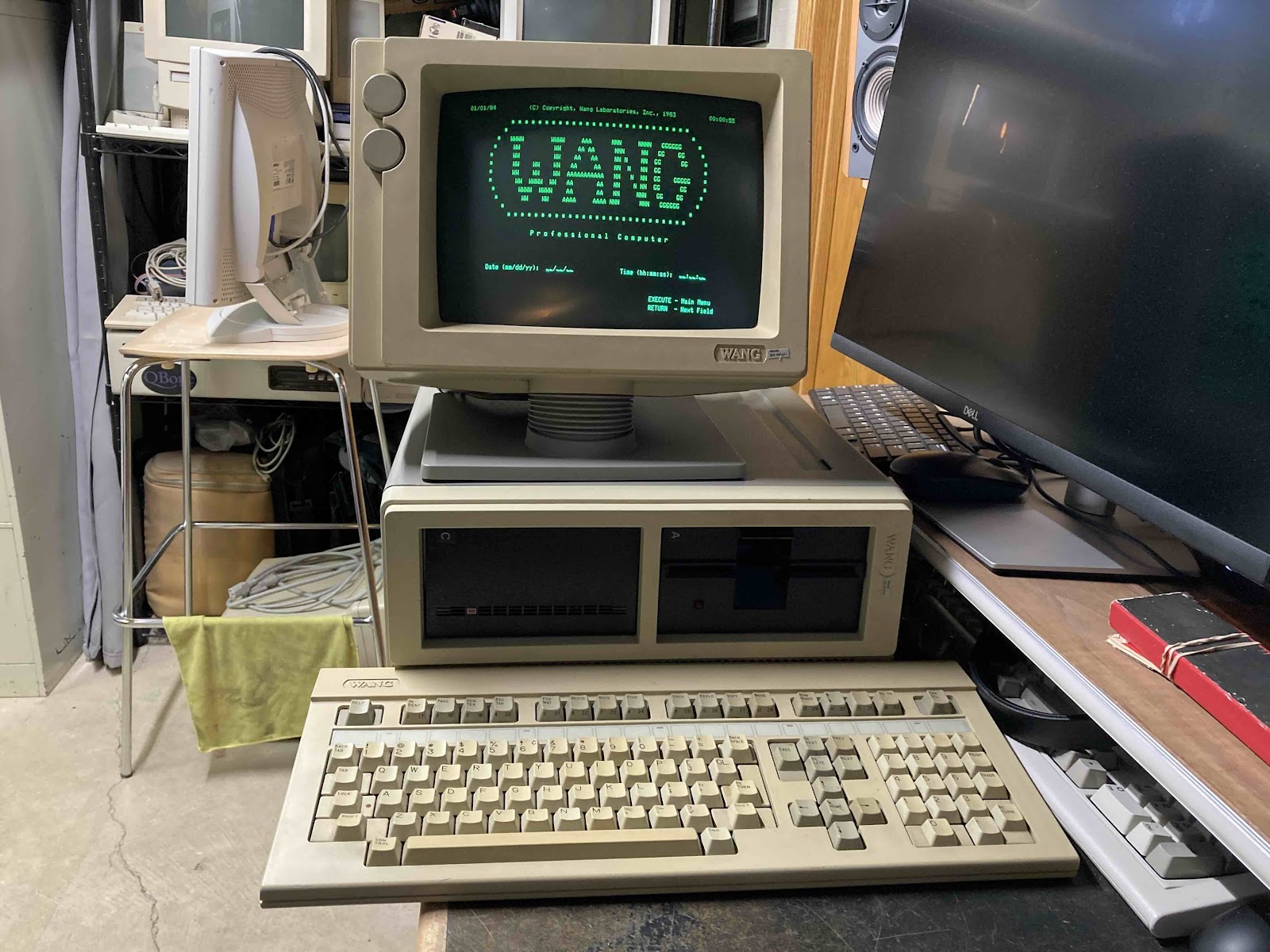
Wang Professional Computer from 1984

 At the end of last year (Dec 2024) I was browsing Facebook Marketplace and saw a somewhat interesting computer that I had never heard of before, a Wang Professional Computer (Wang PC).   I've been interested in Wang since learning about the history of the company founder, An Wang, and his contributions to the history of computing.  He was involved in the development of Core Memory, and was able to use the funds from the sale of that invention to start his computer company Wang Laboratories.

I was interested in the Wang PC but did some research before buying it.  Because this is not IBM PC compatible, you need the custom Wang Keyboard and a custom monitor to use this machine.  The Facebook listing included a Keyboard but not a Monitor.  I was going to take a pass on the machine, but the seller lowered the price to the point that I could not refuse. 

I took the Wang PC apart and did some light cleaning and dusting inside of the case.  The computer appears to be in good shape.  Then it went up on a shelf in storage waiting for a time when I could find a matching CRT at a reasonable price.

Fast-forward 4 months.  I had a saved search for Wang CRT monitors on eBay, and a compatible monitor appeared.  I got the Wang PC down and tested it out to see if the Power Supply was working and if the computer was showing any signs of life without the monitor.  The computer did appear to be working, at least as well as I could tell without a monitor, and I thought it was even booting from the internal Hard Drive.  So I ordered the specialized CRT from eBay.  I was a bit nervous becuase the screen was not guaranteed to work.  But the seller did a great job of packing it and it arrived intact.

I was super happy when I powered the system up with the monitor for the first time and it worked!  Then only a few seconds later, the CRT's horizontal sweep collapsed to a vertical line, what a bummer...


Thankfully I have been able to fix simple CRT problems in the past so I took the monitor apart and started troubleshooting.  I was not able to find a service manual or a schematic, but the circuit board was well labelled.  That is about the best I can say about the circuit board.  When I started removing components to test out of circuit I damaged several traces as they were not stuck to the board very well.  It took me quite a few hours over a couple of different evenings to get the monitor working again, I never did identify a bad component.  I did reflow most of the solder joints on the monitor board so it was likely a cold solder joint from vibration or old age, or the low quality of the circuit board.  Either way the monitor is working again and the Wang PC is usable!


But, then I encountered the next issue, the keyboard was not working well.  I did get a few key presses to register but most of the keys didn't work at all.  Then the ones that had worked stopped working, too.  This was not a huge surprise as I had already read that this was a "Foam and Foil" type keyboard.  I've restored a couple of other brands of these type using these pads that are sold by TexElec so I got another set of those on order and prepared the keyboard by taking it all apart, removing the old pads and doing a through cleaning.  After replacing all tbe pads I did some testing and then fully re-assembled the keyboard.  All the keys appear to be working and I'm quite happy with how it turned out.

Once the keyboard was complete, I was able to explore the computer and see what files were present on the hard drive.  The 10MB hard drive is about 1/2 full.  The drive appears to be working well, it's not making any unusual sounds so that's good.  One interesting feature of the machine is a simple menu that starts up on boot, it allows the user to move around without typing any commands to start programs and move files around...


This machine has the Wang Word Processor installed.  Wang was famous for this.  They had dedicated hardware just for word processing in their previous generation of hardware, which you can see covered on Usagi Electric.  Although my machine is a General Purpose computer, Wang Word Processing is just about the only software installed on this machine.


I tested the Floppy Drive a bit, and it did not seem to be working correctly.  It was functional for a little while, then stopped working.  I took the machine apart and did some cleaning.  I re-seated connectors but there was nothing obvious wrong with the drive.  When I re-assembled in, the drive started working!  I was able to boot the machine from Floppies I had made from Drive Images I found on WinWorld.

And with that repair, the Wang PC is functionally complete!  I'm very happy to have this system.  It will go nicely with my other MS-DOS compatible machine, the Tandy 2000, and maybe this will motivate me to work on another MS-DOS system I've had in storage for a while, a Zenith Z-100 system.

Tandy 2000 Computer Lot - Repaired in 2024

My most recent project has been too repair a large lot of Tandy 2000 computers.  A friend of mine has been collecting these machines for several years and had parts from nine different machines...

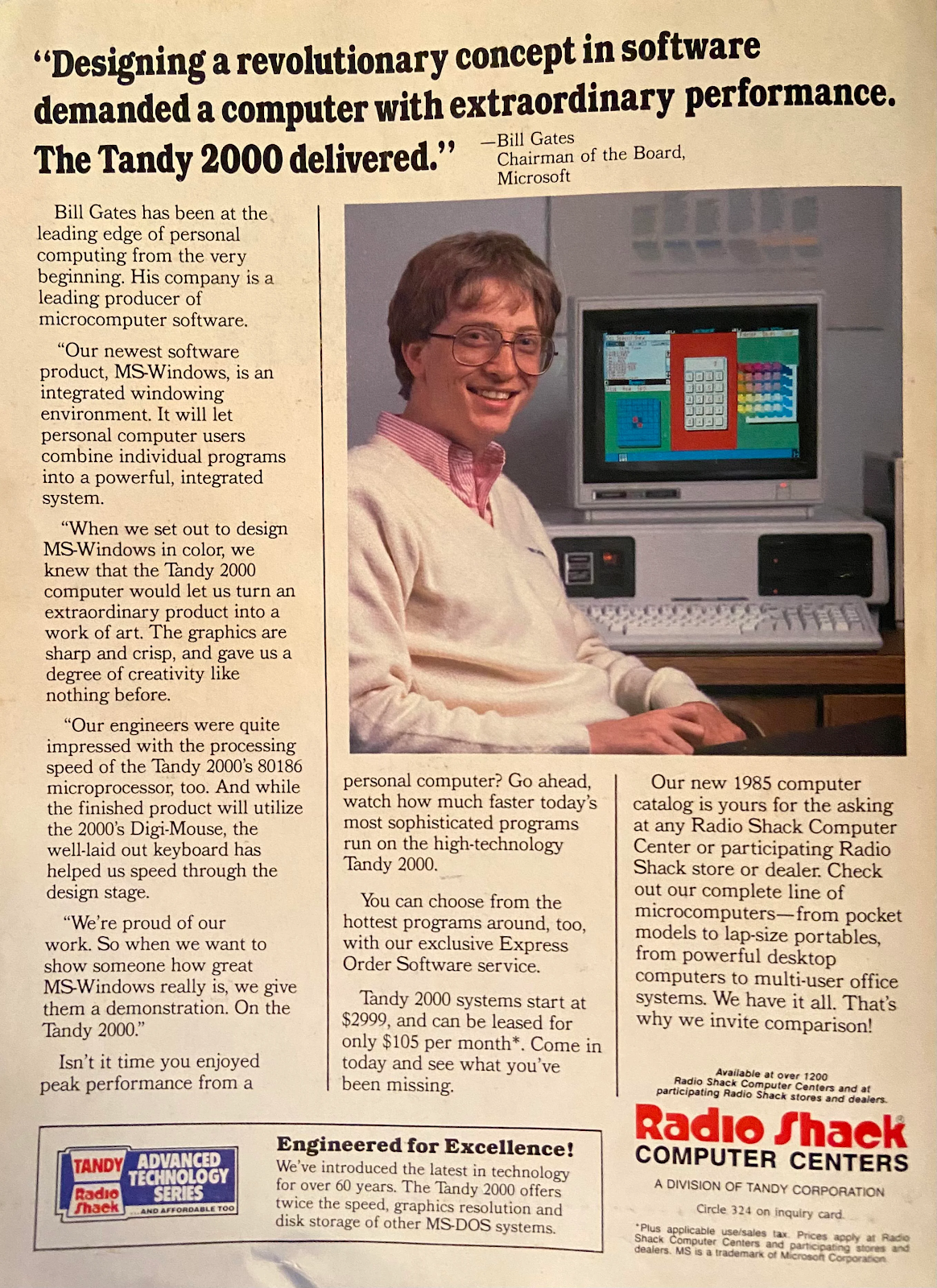
We made an agreement that I would work on repairing these machines and we would split the working computers coming out of the repairs but before discussing the repair let's review a bit of history about this machine.  These machines were designed and built by Tandy in 1984.  They run MS-DOS but they are not compatible with the IBM PC like a Compaq computer from that time period.  Tandy had been successful in the computer business since the beginning of the Home Computer era and compatibility had not been a major concern up till that point so they planned to (and succeeded at) building a more powerful computer.  These Tandy machines are unique because they have an 80186 processor and many other differences from IBM PCs and Compatibles.  Here's an ad from the time showing Bill Gates touting the benefits of this machine...

I'm interested in this period of MS-DOS compatible machines that are NOT IBM PC compatible because I think this is a fascinating period between the end of the 8-Bit CP/M machines and the rise of the PC compatible.

Now onto the repair, as you will see these machines were in rough shape.  It turns out that many of the power supplies are no longer working.  I created the following pinout table for the power supply connector going into the motherboard:

Nominal Voltages of Tandy 2000 Power Supply
Pin            Voltage
Orange      +12 V
Grey          5V
Red            5V
Red            5V
Black         Gnd
Black         Gnd
White        -12 V
Blank

Having the pinout and nominal voltages allowed me to go through and sort out the working power supplies.  I think some recapping will be required in the future but for now I do have enough working power supplies to get 3 working computers.

Next, I tested the motherboards.  Many of the logic boards were showing no signs of life with a known good power supply.  The motherboards have 128K RAM soldered on board (4164 DRAMs), and there was a 128K RAM daughtercard that plugged in on the main board itself.  I went through and separated these and tested and got a known good 128K RAM board and cycled through the motherboards, reseating and swapping chips that were socketed and eventually getting about half of the boards working but without doing any board level repair.

The lot also included expansion cards for High Resolution Color Graphics.  These boards require 256K RAM on the motherboard, and they were needed because the only working monitors we had for this lot were the CM-1 Color Monitor.  A couple of the Graphics boards had corrupt video in the color modes, so those were set aside.

The lot also included memory expansion cards that can hold either 128K or 256K on the board.  In the base configuration these machines could have up to 512K total, although later modifications could take them higher.  Thankfully the RAM chips are socketed on these boards, so I was able to take all the RAM off and cycle the 4164 DRAMs through my RAM tester.  After this there was enough working RAM expansion boards to bring the working computers up to 512K.

Next up for repair was the keyboards.  I had one working keyboard which had gotten damaged and had a couple of the keycaps broken off it turns out that was just mechanical damage and I was able to re-assemble and glue plastic parts back together.  The next repairs required me to take the keyboards apart.  One of the symptoms I noticed was that the lights on the Shift and Num Lock keys would come on, indicating that the keyboard had power but then none of the keypresses would work (indicating maybe a bad matrix).  Other keyboards had no power on them at all (which may indicate a bad cable).  I moved the cables around and I was able to get 3 more working keyboards out of the lot.  If needed, the cables can be transplanted into a Tandy 1000 keyboard, but those are getting hard to find, too.

The next order of business was the Floppy Disk drives.  The non-hard drive machines had two drives each and surprisingly most of the drives were in good working order.  I only had to swap around a couple of the drives and I was able to clean them with a normal floppy cleaning disk.  I didn't need to take them apart and lubricate them, although I should.  I was able to prove that both the A and B drives were working by using the disk duplication program called compdupe to create copies of the MS-DOS boot disk.  This machine can be difficult to create disks for because it's a Double Sided / Quad Density drive that can hold 720K.  It works with normal DS/DD media, which I have plenty of, but I still haven't found a way to create disk images, although I understand there are instructions online.

So, this wraps up the repairs, at least for now.  My friend and I split up the machines and we are both very happy to have Tandy 2000s in our collection, here's mine...


There's still a bit of extra material coming out of the repair, hopefully enough to make another working machine.  This material been offered to another Vintage Computer collector so perhaps the repair project will continue.  In the future, I have a couple of upgrades I'd like to do on the Tandy 2000s.  I'd like to figure out how to get the Hard Drive working again on the Hard Drive machine or get it working with an MFM Emulator.  I'd also like to see if I can replace one of the physical floppy drives with a Go-Tek.  This would make it much easier to work with the odd floppy format as there is quite abit of software avaliable for the machine online.  But for now I'm glad to have the project completed and move on to to the next Vintage Computer project.

Do you have memories of the Tandy 2000?  If so please feel free to reach out in the comments or send me an email, my address is posted in my Blogger profile.